More and more companies are implementing fleet tracking strategies to help improve their overall logistical performance and customer service capabilities. With increasingly affordable fleet tracking tools, most notably GPS tracking, service managers are able to provide their freight or transportation drivers and customers with real-time delivery information.
Gone are the days of guessing where a package or a vehicle is for time-critical deliveries. With GPS vehicle tracking systems specifically designed for fleet tracking, you know where your vehicles are at all times and can anticipate when they will reach their intended destinations.
Another very useful aspect of GPS fleet management is the fact that it makes asset management simple. With the right system to meet your needs, you can rest assured that all of your vehicles can be found with pin point accuracy at the push of a button.
Companies around the globe have enjoyed the benefits of using GPS fleet tracking systems. These benefits include peace of mind, inventory control, real-time response capability and better employee production. This last feature, while unintended in many cases, still helps reduce the likelihood of drivers not performing their duties in a timely manner.
GPS fleet tracking also makes it easy for companies to stay incompliance with FMCSA (Federal Motor Carrier Safety Regulations) HOS (Hours-of-Service) regulations by tracking and limiting the amount of road time their drivers perform.
This is necessary when the red light fails to come on when there is motion. This typically happens when the devices batteries die when it is in what is call the “Delay Mode”.

From time to time customers ask why their tracker does not give destinations when they have it set to report every hour etc…
The reason being is that they are using it in conjunction with the hibernating battery pack. The battery pack automatically turns off the tracker after 5 minutes of being still. Your update interval has to be less than the time it takes to go to sleep.
TrackingTheWorld is always adding new features to it’s GPS tracking software. Now I will go over the changes with the new geo fencing system
Now you are able to draw a box and not just use what is on your screen at the time. After you click “Geo Fence” to activate your geofence console double click on the furthermost point that you want your fence to be. Now double click on the opposite furthermost point and you have just drawn
Next you may have noticed the new box next to your geo fence console.
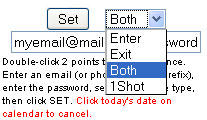
Enter – Only when the GPS tracker enters a defined area
Exit – Only when the GPS tracker leaves a defined area
Both – Both when the GPS tracker enters and exits a defined area
1-Shot – Just a simple 1 time geofence that will disappear after the GPS tracker has been violated the fence.
Now enter the email or phone number you want alerted. You can have multiple people alerted by adding “;” between each recipient and you can also have it send an SMS text message if you use the following syntax. +1phonenumber.
Do not include any spaces or dashes
ex. (+15552221212)
After this use your password (same password for polling) and hit set. To verify that the fence has been saved look at the bottom of the screen and it should say “Fence Saved”.
To delete a fence click the geo fence button, click on the delete text next to the fence. Now enter your password and click on “set”. Those fences have now been deleted.


